
Your AI Knows the Answer. MCP Lets It Take the Action.
Most AI implementations stop at the chat interface. The AI answers questions, summarises documents, and generates content — but it can't update your CRM, pull live data from your analytics, check inventory in Shopify, or post to your project management tool. It's smart, but it's isolated.
Model Context Protocol (MCP) is the infrastructure layer that changes this. It's the open standard that lets AI agents connect to your actual business tools — reading live data, writing updates, triggering actions — so AI stops being a question-answering tool and starts being an operational layer that works across your entire stack.
ENZO Digital builds MCP integrations for B2B companies ready to move beyond chatbots. We connect your AI to the tools your business runs on — and build the workflows that let it act, not just advise.
AI Agent
Sheets
Slack
Shopify
Notion
Gmail
HubSpot
AI Agent
Sheets
Slack
Shopify
Notion
Gmail
HubSpot
✦ One AI. Every tool. Connected.
AI that can't touch your data is just an expensive search engine
Isolated from your actual data
Your AI assistant has been trained on the internet. It has not been trained on your CRM, your customer history, your live inventory, or your current pipeline. Every time you ask it something business-specific, you're manually copying and pasting context into a chat window — because the AI has no way to access the data itself. That's not a workflow. That's a workaround.
Actions that require humans in the loop
AI can tell you what to do but cannot do it. It can draft the CRM update but cannot enter it. It can identify the Slack message that needs a response but cannot send one. Every AI recommendation that requires a human to go execute it is friction that accumulates into hours of manual work every week — work that the AI could handle autonomously if it had the right connections.
Integration projects that never get finished
Building custom integrations between AI systems and business tools is expensive, slow, and brittle. Every new tool requires a new connector. Every API change breaks something. Most companies end up with a patchwork of half-finished integrations and a growing list of ‘we’ll get to that’ automation ideas that never quite get there.
WHAT MCP ACTUALLY IS
MCP explained — without the jargon
Model Context Protocol is an open standard introduced by Anthropic that defines a universal way for AI models to connect to external data sources and tools. Think of it as the USB standard for AI connectivity — before USB, every device needed its own proprietary connector. After USB, one standard worked for everything. MCP does the same thing for AI and business tools.
Before MCP, connecting an AI agent to a business tool required a custom integration built specifically for that combination — a bespoke connector between your AI and your CRM, a different one for your project management tool, another for your analytics platform. Each one was a separate project, a separate maintenance burden, and a separate point of failure.
With MCP, any AI system that supports the protocol can connect to any MCP server — a standardised wrapper around a tool or data source — using the same interface. Build an MCP server for your CRM once, and any compatible AI can use it. The protocol handles the communication layer; you only need to define what the AI is allowed to do.
In practice, this means an AI agent with MCP connections can read a live record from your CRM, check current stock levels in your inventory system, pull the latest performance data from your analytics platform, update a project status in your task management tool, and send a notification via Slack — all in a single workflow, with no human copying and pasting between systems.
The key distinction from earlier integration approaches is that MCP is context-aware. The AI doesn't just receive a data dump — it receives structured, relevant context that it can reason about, act on, and use to make decisions. The difference between an AI that has access to your data and an AI that understands your data well enough to act on it is the difference MCP makes.
Without MCP
AI answers from training data only
No access to live business data
Every action requires a human
Custom connectors for every integration
Knowledge cutoff limits usefulness
With MCP
AI reads live data from your tools
Context-aware actions across your stack
Workflows run autonomously end to end
One protocol, every compatible tool
Always working with current information
What your AI can actually do with MCP connections
The right way to think about MCP integrations is not by tool but by capability — what your AI becomes able to do once it has the right connections in place. Here are the six operational capabilities MCP unlocks.
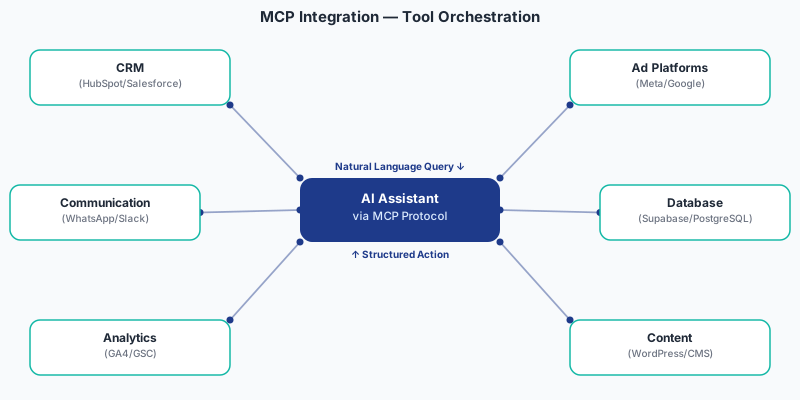
Read live business data
Pull current records, metrics, and status updates from any connected source. Your AI can check today's pipeline in your CRM, read the latest campaign performance from your analytics platform, or pull inventory levels from your e-commerce store — without you providing any of that context manually. It accesses the source directly and works with current information, not a snapshot from the last time you copied something into a chat.
Write and update records
Move beyond read-only. An AI with write permissions can update a CRM record after a call, log a completed task in your project management tool, add a note to a customer profile, or create a new entry based on information it processed — all as part of a workflow, without human intervention at each step.
Trigger actions and workflows
MCP lets AI initiate real actions: send a Slack notification when a specific condition is met, create a task when an anomaly is detected, fire a webhook that kicks off a downstream workflow, or schedule a follow-up based on a conversation outcome. The AI becomes an actor in your business processes, not just a commentator on them.
Synthesise across systems
The most valuable insights often live at the intersection of multiple data sources — combining CRM data with analytics data with financial data. With MCP connections across systems, your AI can synthesise information from multiple sources simultaneously, producing analysis that would take a human analyst hours to assemble.
Keep context current
AI working from static context gets stale fast. MCP connections mean your AI always has access to current information — the live state of your pipeline, today's performance numbers, the most recent customer interaction — without you needing to manually refresh what it knows. Workflows that require up-to-date context run reliably, every time.
Operate within defined permissions
MCP is not unrestricted access. Every connection defines precisely what the AI can read and what it can write, to which systems, under what conditions. You control the permissions; the AI operates within them. This makes it practical to deploy AI autonomy in production without the governance concerns that come from giving an AI unconstrained access to your business data.
INTEGRATION EXAMPLES
What this looks like in practice — real workflow examples
The most useful way to understand MCP integrations is through concrete workflows. Here are five examples of what becomes possible once the connections are in place.
Sales intelligence workflow
An AI agent with MCP connections to your CRM and your email reads the incoming lead record, pulls the company's public information, checks whether similar companies in your CRM converted, and drafts a personalised outreach message — then logs the draft back into the CRM as a note, ready for your sales team to review and send. What previously took 20 minutes of research and writing takes 45 seconds, and the output is grounded in your actual customer data.
Performance reporting workflow
An AI agent connected to your analytics platform, your ad accounts, and your project management tool pulls the week's performance data every Monday morning, synthesises it into a structured summary, flags the three metrics that moved most significantly, creates a task in your project management tool for each flagged item, and posts the summary to your team's Slack channel — before anyone has opened their laptop.
Customer support escalation workflow
An AI agent monitoring your support inbox reads incoming tickets, checks the customer's order history and previous interactions in your CRM, categorises each ticket by type and urgency, drafts a response for standard queries, and creates a prioritised task in your support queue for complex issues — with the customer context already attached. Your support team reviews escalations rather than triaging every incoming message.
Inventory and reorder workflow
An AI agent connected to your e-commerce platform and your supplier communication channel monitors stock levels continuously. When any SKU drops below a defined threshold, it pulls the supplier's lead time, calculates the reorder quantity based on recent sales velocity, drafts a purchase order, and notifies the relevant team member for approval — with the full context and recommendation already prepared.
Content performance and strategy workflow
An AI agent connected to your analytics platform, your content management system, and your project management tool reviews content performance weekly. It identifies which topics and formats are driving the most engagement, creates a brief for the next content piece based on what the data shows is working, assigns it in your project management tool, and logs the performance baseline so the next review has something to compare against.
HOW WE WORK
How we approach an MCP integration engagement
Tool and workflow audit
We start by mapping the tools your business runs on and identifying the specific workflows where AI connectivity would create the most value. Not every tool needs an MCP connection — we focus on the integrations that unlock genuine operational improvement, not connections for connection's sake.
MCP server build and configuration
For each prioritised tool, we build or configure the MCP server — the standardised wrapper that defines what the AI can access and what it can do. This includes permission scoping, data structure mapping, and the action definitions that tell the AI what operations are available.
AI agent workflow design
With the connections in place, we design the actual workflows — the sequences of actions the AI agent executes, the conditions that trigger them, the outputs it produces, and the escalation paths for cases that require human review. Every workflow is mapped against a specific business outcome before it's built.
Testing, deployment, and monitoring
Workflows are tested against real data before deployment, with edge cases and failure modes explicitly handled. After deployment, we monitor performance and refine workflows based on how they perform in production. MCP integrations are not set-and-forget — they improve as the AI encounters more real-world cases.
FEATURES
What every MCP integration engagement includes
Tool and workflow audit
A structured review of your stack and identification of the highest-value integration opportunities.
MCP server build or configuration
Custom MCP server development for each connected tool, with correct permission scoping.
AI agent workflow design
End-to-end workflow mapping from trigger to output, designed around specific business outcomes.
Permission and governance framework
Explicit definition of what the AI can read and write, to which systems, under what conditions.
Integration testing against real data
Workflows tested with production data before deployment, with edge cases explicitly handled.
Deployment and monitoring setup
Live deployment with performance monitoring and alerting for workflow failures.
Team onboarding and documentation
Your team understands what the AI agent does, how to review its outputs, and how to escalate edge cases.
Ongoing refinement
Monthly review of workflow performance and iterative improvement based on real usage data.
WHO IT'S FOR
Who MCP integration is right for
B2B companies with complex tool stacks
If your business runs on a combination of CRM, project management, analytics, and communication tools, MCP integration is the infrastructure that lets AI work across all of them — not just within one.
Operations and growth teams
Teams spending significant time on data collection, report assembly, and workflow coordination are the biggest beneficiaries of AI agents that can handle those tasks autonomously.
Companies that have tried AI tools and hit the ceiling
If you've implemented AI assistants and found them useful but limited by lack of data access, MCP is the layer that removes that ceiling.
Businesses scaling across India, UAE, US, and UK
MCP integrations work across cloud-based tools regardless of geography — building the AI operational layer that scales with your business.
FAQS
Frequently asked questions about MCP integration
Model Context Protocol (MCP) is an open standard introduced by Anthropic that defines a universal way for AI models to connect to external tools and data sources. It matters because it solves the core limitation of most AI implementations — isolation from real business data. Without MCP, AI can only work with context you manually provide. With MCP, AI connects directly to your CRM, analytics platform, project management tools, and more — reading live data, writing updates, and triggering actions as part of real workflows. It's the infrastructure layer that moves AI from a smart assistant to an operational component of your business.
Any tool that exposes an API can be wrapped in an MCP server and connected to an AI agent. Common integrations include CRM platforms such as HubSpot and Salesforce, project management tools like Notion, Linear, and Asana, communication platforms including Slack and Gmail, analytics and reporting tools, e-commerce platforms including Shopify, and custom internal databases and systems. The breadth of what's connectable is one of MCP's key advantages over earlier integration approaches — the protocol is tool-agnostic.
A standard API integration connects two specific systems with a custom-built connector that someone has to maintain. MCP provides a standardised protocol layer that any compatible AI can use — so building an MCP server for one tool makes it accessible to any AI system that supports the protocol, not just one specific integration. It also provides richer context than a raw API call — MCP connections are designed to give AI agents structured, actionable context, not just raw data endpoints. The practical difference is speed, flexibility, and the ability to add new AI capabilities without rebuilding integrations from scratch.
MCP is designed with permission governance as a first principle. Every MCP server defines precisely what operations are available — what data can be read, what can be written, what actions can be triggered — and the AI operates strictly within those defined boundaries. We build every engagement with explicit permission scoping as a core deliverable, not an afterthought. The AI cannot access data or take actions outside what the MCP server explicitly permits. This makes it practical to deploy AI autonomy in production business environments with appropriate oversight.
A single-tool MCP integration — connecting one platform with a defined workflow — typically takes 2 to 4 weeks from audit to deployment. Multi-tool integrations with complex cross-system workflows typically take 4 to 8 weeks, depending on the number of tools and the complexity of the workflows being automated. We structure engagements to deliver the highest-value integration first so you see measurable impact before the full scope is complete.
You Might Also Need
Connect your AI to the tools your business runs on.
Stop working around the gap between what your AI knows and what your business needs it to do. MCP integration is the infrastructure layer that closes it — giving your AI live data access, the ability to take action, and the context to make decisions that actually move your business forward.
Built by ENZO Digital. Custom AI automations engineered for real business outcomes.